
GitHub
Section titled “GitHub”All our projects live on GitHub. If you don’t have an account, make one first.
CLI or Desktop
Section titled “CLI or Desktop”Some of us use the command line, some use GitHub Desktop. Both work fine.
- If you’re using the CLI, make sure you’re authenticated with a Personal Access Token (PAT).
- If you prefer a GUI, download GitHub Desktop.
Using Branches
Section titled “Using Branches”Never commit directly to main or master. Always branch off:
# Create a new branch for your feature or fixgit switch -c your-feature-nameBranch naming convention:
feature-name → new features
fix/bug-name → bug fixes
cleanup-name → maintenance and refactors
Creating Pull Requests
Section titled “Creating Pull Requests”Once you’ve wrapped up your work on the feature branch, push it to origin:
git push origin feature-nameThen go to the repository on GitHub. You’ll see a prompt to open a pull request. Click Compare & pull request, add a name and description, and submit.

Asking for Reviews
Section titled “Asking for Reviews”Tag teammates as reviewers using the Reviewers section in the PR sidebar. If your code isn’t ready but you want early feedback, open it as a Draft Pull Request.

Merging the Pull Request
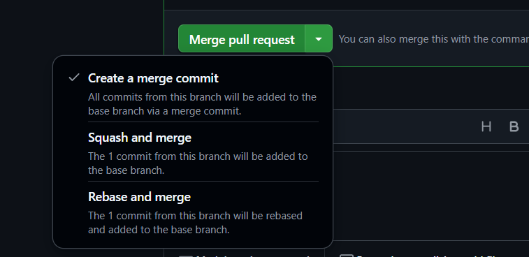
Section titled “Merging the Pull Request”Once it’s approved and checks pass, choose a merge strategy:
-
Squash & merge (preferred for small changes)
-
Rebase & merge
-
Merge commit (for larger features with multiple commits)
After merging, delete the branch.
Removing the Repo’s Entire History
Section titled “Removing the Repo’s Entire History”Use this when publishing a clean package or template. This is irreversible.
# Clone the repo (skip if you've already got a cloned repo)git clone git@github.com:USERNAME/REPOSITORY.gitcd REPOSITORY
# Remove all existing Git historyrm -rf .git
# Create a new local repogit init
## If your default branch is master, switch to maingit branch -M main
# Stage and commit everythinggit add .git commit -m "First commit"
# Force push — this permanently erases history on GitHubgit remote add origin git@github.com:USERNAME/REPOSITORY.gitgit push -u --force origin main
Warning: This is irreversible. Only do this for publishing clean packages or templates.
Keeping Your Fork or Branch Updated
Section titled “Keeping Your Fork or Branch Updated”To avoid conflicts, regularly sync with main:
# Pull the latest changes into your branchgit fetch origingit rebase origin/mainIf you’re working from a fork:
git remote add upstream git@github.com:ORIGINAL_OWNER/REPO.gitgit fetch upstreamgit rebase upstream/main